
Warehouse software with a mobile scanner app
Your warehouse under control, from receiving to shipping
Paletko knows what you have, where it is and when it expires. Warehouse staff work with a scanner and barcodes, while the office sees everything in real time.
1 system
from receiving to shipping
FEFO
first expired, first out – automatically
Android
scanner app that updates itself
3PL
many companies in one warehouse, billed separately
Before and after
Your warehouse should not be guesswork
With Excel and paper
- You search the shelves for the goods
- Expired lots are found too late
- Wrong item or pack size in the order
- Stocktaking stops the warehouse for a day
- “What is urgent today?” is asked by phone
- Spreadsheets by email and manual retyping
With Paletko
- Every pallet is in a known bin, found by barcode
- The earliest expiry goes out first, with alerts for expiring lots
- The scanner checks every pick
- Count bin by bin while the warehouse keeps working
- The board shows what is late and what is due today
- One place for everything, with the history of every movement
Tour
Take a look inside Paletko
Real screens from the app, with sample data for four companies.
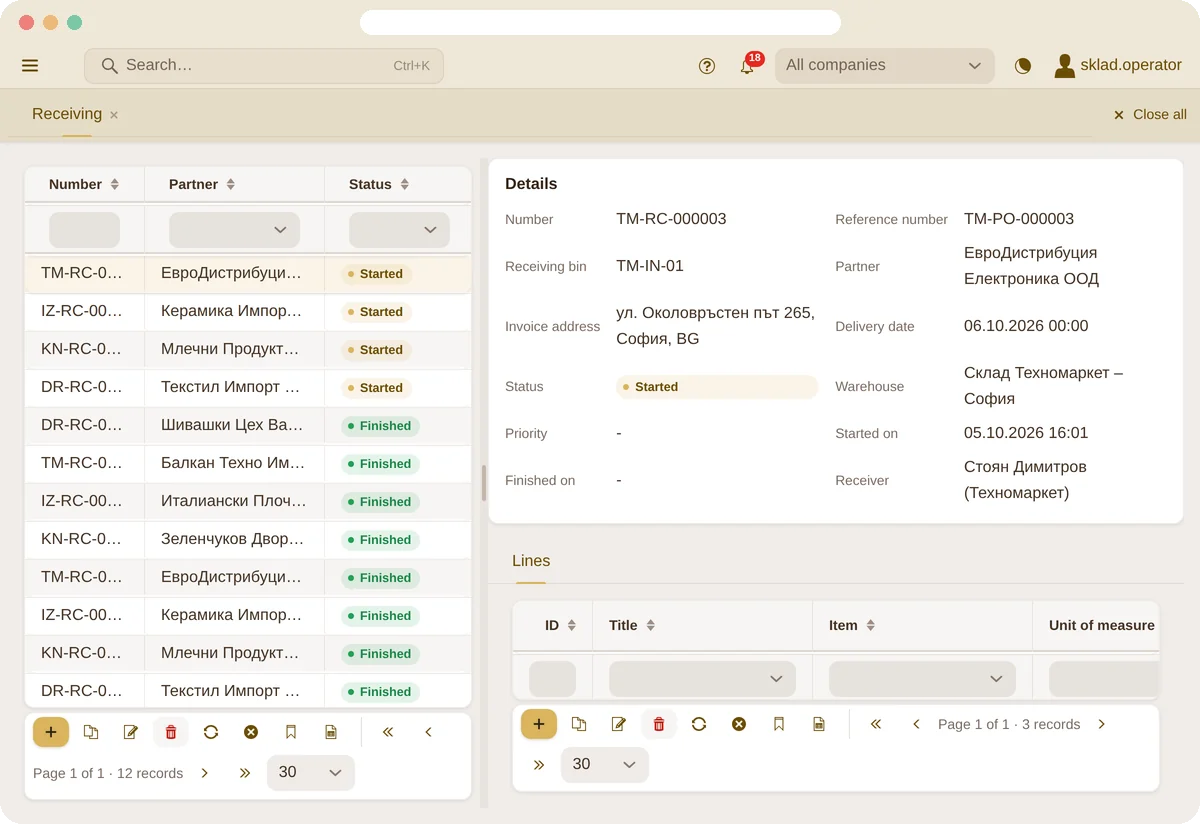
Receiving
Receiving without retyping
Purchase orders from a supplier are combined into one receipt at the inbound dock. The worker scans, enters lot and expiry, and the stock appears right away.
- Several purchase orders in one receipt
- Lot and expiry date while scanning
- Received against ordered on every line
Bins
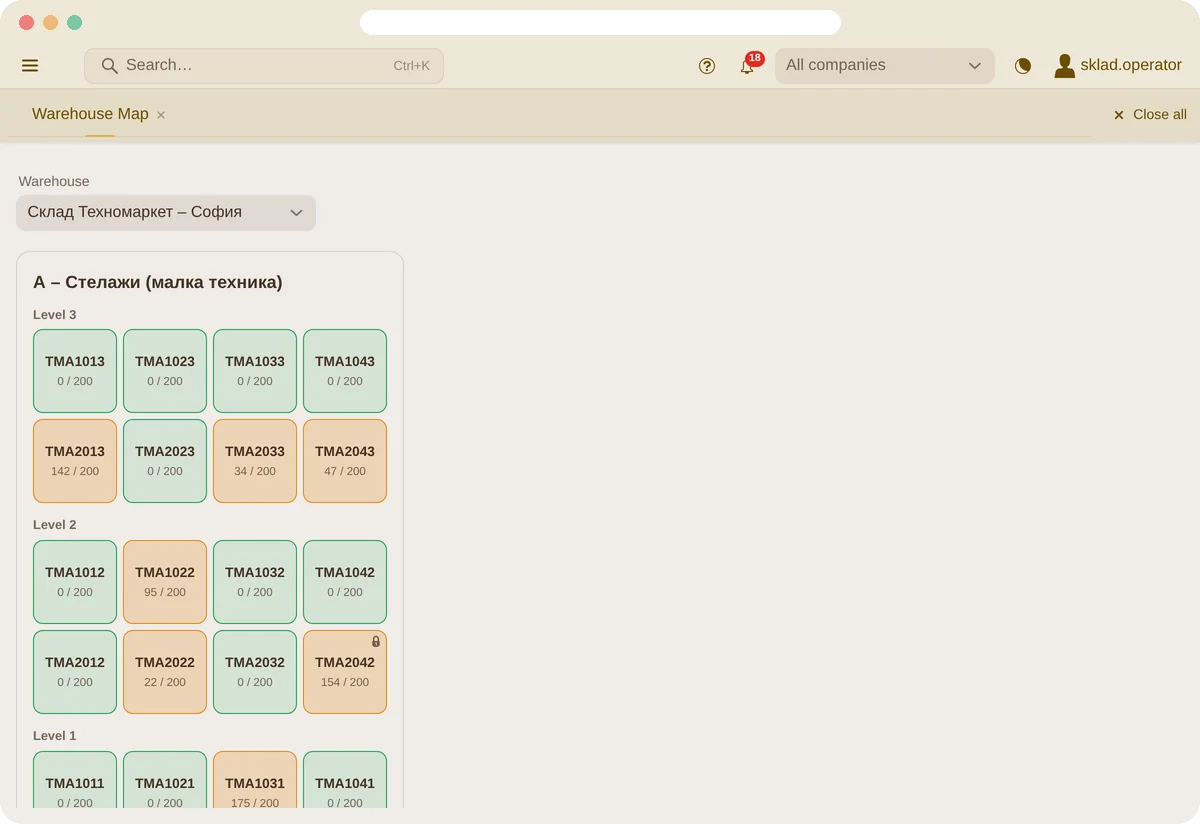
Every pallet in its place
Warehouses, zones and bins on levels, with a map that shows how full each bin is. The generator creates a whole rack at once.
- Warehouse map and tree
- Bin generator by row, column and level
- Barcode labels for every bin
Picking
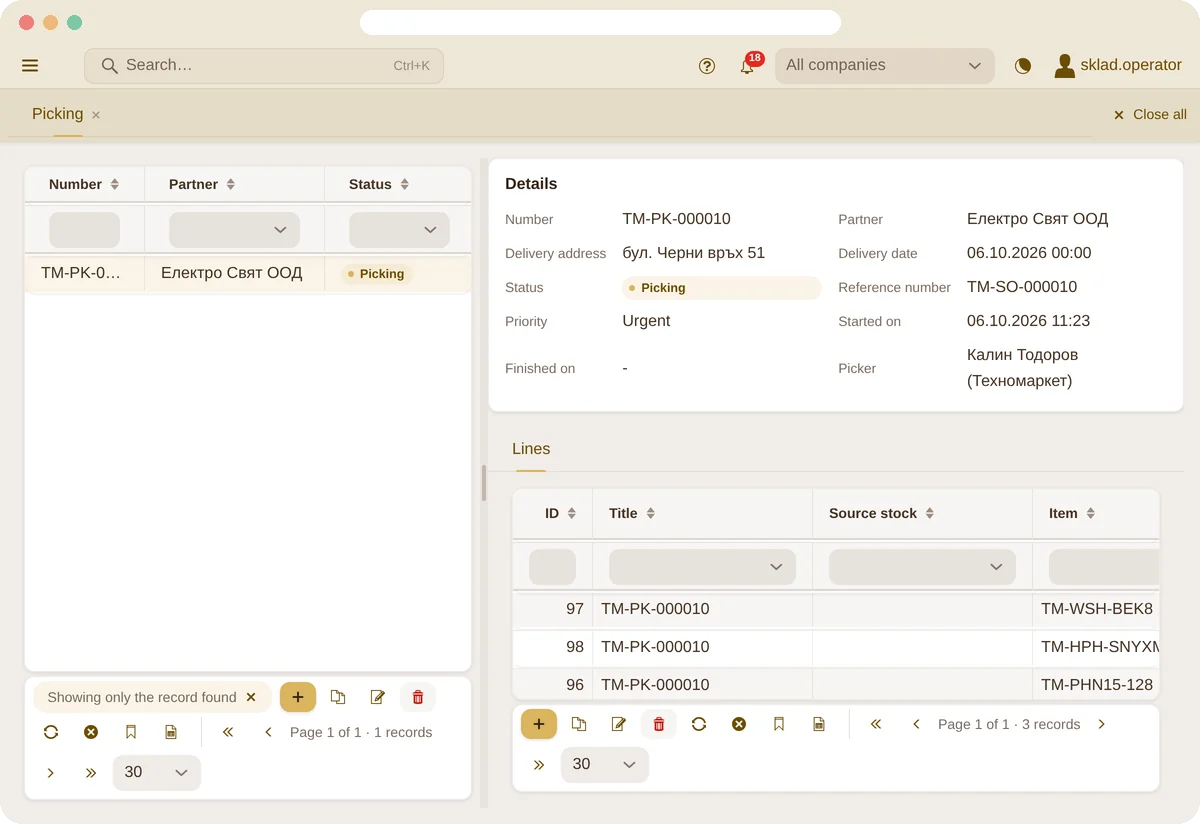
Reservation and picking
Paletko reserves stock by earliest expiry, splits it into pallets, cartons and pieces, and guides the picker on the scanner.
- Automatic reservation, earliest expiry first
- Split by pallet, carton and piece
- Every pick checked with the scanner
Expiry
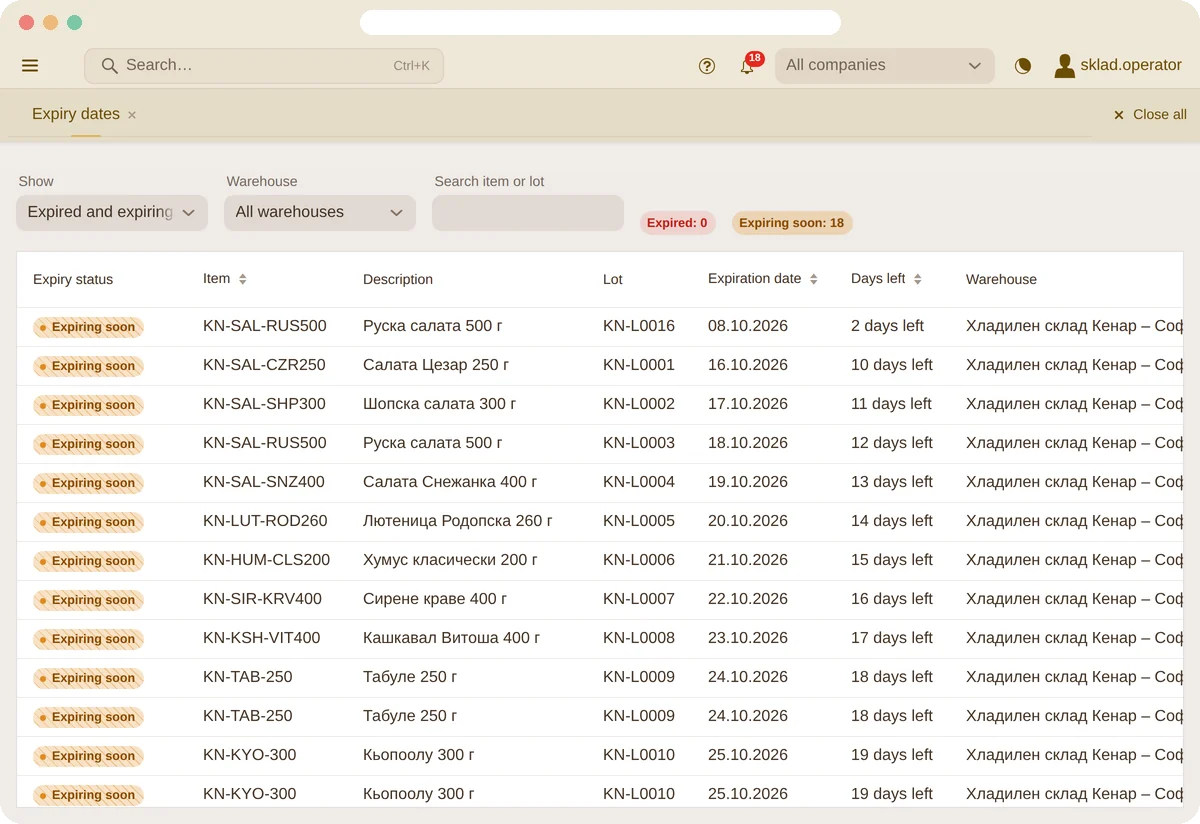
Nothing expires unnoticed
The report shows expired and expiring lots by warehouse and bin, and an email alert arrives every day.
- Warning threshold per item or for the whole company
- Block a lot with one click
- An expired lot cannot be sold
Board
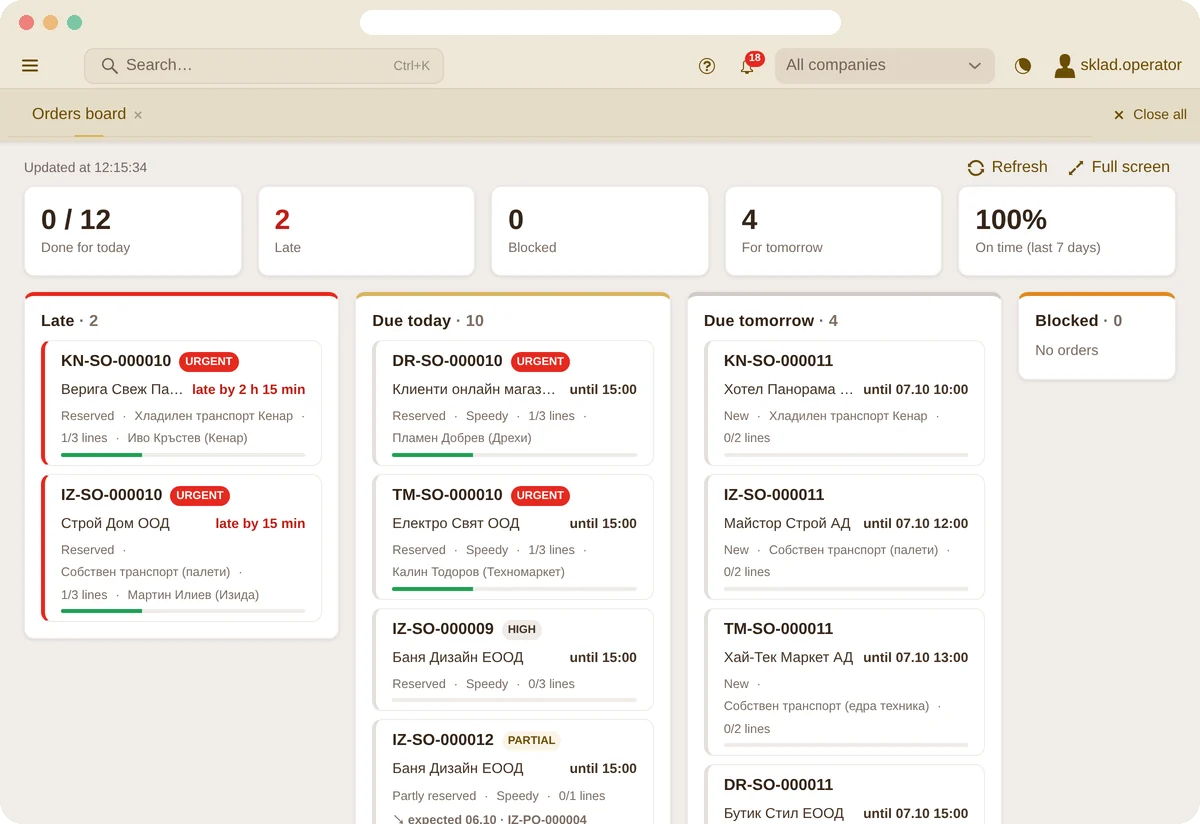
What has to leave today
Open orders in four lanes – late, due today, due tomorrow and blocked – based on the courier’s cutoff. On a big screen in the warehouse.
- Cutoff time per courier
- When the missing goods arrive
- Full-screen mode that refreshes itself
Reports
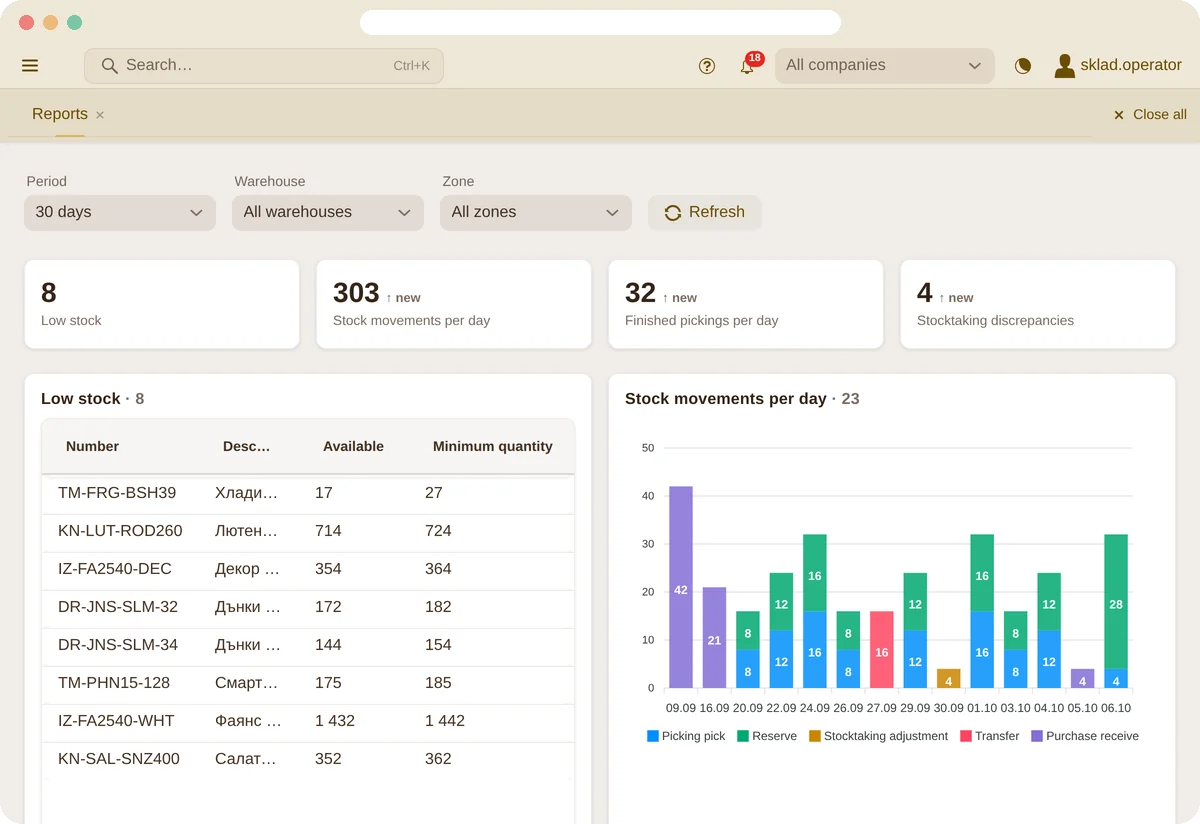
The numbers, without digging
Low stock, movements per day, picker workload and stocktaking differences – filtered by warehouse and zone.
- Stock value and margin
- Turnover and suggested orders
- Excel export from every table
Integrations
Connects to the store you already use
Online store orders arrive in the warehouse by themselves, and real stock levels flow back – no retyping and no selling goods you don’t have. Courier waybills are made from Paletko too.

Shopify
Orders arrive instantly via webhook, stock levels are pushed to the store automatically.
WooCommerce
The same for WordPress stores: orders in, stock out.

Couriers
Waybills through Econt, Speedy, DPD and Sameday, created from Paletko.

+ Your system
An ERP, accounting or another store? Connections are built as separate modules, so a new integration is added without touching the rest.
- Connect an online store in 2 minutes
- Items are matched by SKU
- Every company has its own store
- Sync errors are visible in Paletko
Flexibility
Not like most warehouse systems
Most WMS make you work their way. Paletko adapts to your warehouse – and keeps evolving with the way its customers work.
New screens without coding
An administrator builds a page from the data – columns, tabs, a place in the menu – without a new release.
Everyone works their way
Saved filter views, column widths and the order of form fields – per user.
Rules are settings, not code
Expiry warning threshold, cutoff time per courier, partial deliveries per customer, receiving tolerance.
Many companies, one warehouse
Each company with its own warehouses, numbering, settings, users and service prices.
Excel in and out
Import items and partners with a preview before saving, export from every table.
Grows with you
Our own product, developed in-house – a feature for your process doesn’t wait for a global vendor.
Features
Everything a modern warehouse needs
No add-on modules and no hidden extras – it is all in the product.

Lots and expiry (FEFO)
Expiry date per lot, first-expired-first-out picking, alerts for expiring lots and lot blocking.

Bins and warehouse map
Warehouses, zones and bins, a rack generator, a warehouse map and a tree of the stock in every bin.

Mobile scanner app
Receiving, picking, moving and stocktaking with a barcode scanner on Android.


Stocktaking
Count by bin or by zone, the place is locked while it is counted, differences are posted automatically.

Orders board
Late, due today, due tomorrow and blocked orders – on a big screen in the warehouse, refreshed automatically.

Online store connection
Shopify and WooCommerce orders come in automatically, and real stock levels flow back to the store.

Many companies (3PL)
Goods of several clients in one warehouse, with separate stock, users and billing of services.

Invoices and credit notes
An invoice for a packed or finished order with the company’s next number, credit notes and PDF documents.
Couriers and waybills
Waybills through Econt, Speedy, DPD and Sameday, and the orders board sorts orders by courier cutoff.

Notifications
A bell for late and unblocked orders, late deliveries, low stock, applied stocktakings and store sync failures.

Monthly report
A report for the month in the app and by email on the 1st – including an estimate of the time saved.

Support inside the app
A “Contact us” chat right in Paletko, answered by the Paletko team.

Dark mode
A light or a dark interface – one click away.

Documents and labels
Picking lists as PDF, barcode labels for bins and items, Excel import and export.
Mobile scanner app
A warehouse that runs on scanners, not paper
The Android app guides the warehouse worker step by step: which bin, which item, how many. Every scan is checked on the spot.
- Picking with a barcode check on every pick
- Receiving with lot and expiry date
- Bin-to-bin moves and lookup by barcode
- Stocktaking along a route through the warehouse
- Notes between the warehouse and the office
- Updates itself, no cables or manual installs
Who it is for
Built for warehouses that grow
Distributors and wholesalers
Many items, pack sizes and customers who expect accurate deliveries.
3PL warehouses
Goods of several clients in one warehouse and billing of services per company.

Food, cosmetics, healthcare products
Lots and expiry dates, first-expired-first-out and traceability.
Pricing
Clear prices, no surprises
A monthly subscription by the number of users. Every plan has every feature – only the team size and the support differ.
Base
up to 5 users
€60
per month
- No support
Premium
6–10 users
€100
per month
- Up to 20 support questions a month
Pro
11–20 users
€150
per month
- Unlimited support
Enterprise
more than 20 users
Custom quote
- Unlimited support
In every plan
- Web application and Android scanner app
- All the features described
- Unlimited items, bins and documents
- Data migration and team training
- Updates
- EU cloud with daily backups
Questions
Frequently asked questions
What hardware do I need?
A device with Android 9 or newer. Paletko works with a terminal with a built-in scanner, a handheld barcode scanner or the camera of an ordinary phone. For the office, a browser is enough.
How long does it take to get started?
Usually up to one week: we move your data over, set up the bins, train the team, and the warehouse starts working with Paletko.
How do we move our data?
We move it for you – items, partners and stock from Excel or an export of your old system. Later you can also import it yourself from Excel.
Where is the data kept, and is it backed up?
Paletko runs in the cloud in the European Union, with a backup every day. You don’t need your own server.
Does it work without internet?
No. Scanners and the office work with the same data in real time, so the warehouse needs Wi-Fi or mobile data.
Is there training and support?
Yes. We train your team at the start. Support depends on the plan: Premium – up to 20 questions a month, Pro and Enterprise – unlimited.
How is it paid?
With a monthly subscription by the number of users: Base (up to 5) – €60, Premium (6–10) – €100, Pro (11–20) – €150. More than 20 users – custom quote.
Does it connect to my online store?
Yes – with Shopify and WooCommerce: orders come in automatically and stock flows back to the store. We add connections to other systems on request.
Demo
See Paletko in action
Leave your details and we will get in touch to show you Paletko with sample data – in the browser and on the scanner.